
Telegram X
Telegram FZ-LLCSocial
3.910.66K Reviews
- Version
- Varies With Device
- Installs
- 100.00M
- Age Rating
- Mature 17+
Screenshots




Our Review of Telegram X
 Analysis by Appyee
Choosing a messaging app is less about finding the one with the longest feature list and more about deciding what you want to feel effortless: keeping up with busy group chats, finding a familiar contact, controlling how the screen looks, or moving between devices. I tried Telegram X with those everyday needs in mind. It is a free social app from Telegram FZ-LLC, and its appeal is strongest when you want a responsive, adjustable chat experience rather than a bare-bones way to send messages.
Start with the habits you want the app to support
Before switching, I would ask myself how I use messaging now. If most of your conversations are with people who already use Telegram, this app can be an appealing way to organize and follow them. If your friends and family are spread across different services, the best choice may simply be the app they already check. A polished interface cannot solve the practical problem of important people being somewhere else.
Telegram X is worth considering if you spend enough time in chats to care about navigation, visual comfort, and small interaction details. Its interface puts more emphasis on a fluid feel than many no-frills messengers do. That matters most when you move between conversations repeatedly, not when you send one message and close the app.
The app is listed with a 3.9 average from around 852,000 ratings, and it has been installed over 100 million times. I read those figures as a sign that it has a substantial audience, not as a guarantee that its interface will suit everyone. Its Mature 17+ age rating is also worth noting for anyone choosing an app for a younger family member.
What Makes Telegram X Stand Out?
First off, let’s talk about the interface. It’s sleek, it’s fast, and it’s just got this vibe that makes it stand out from the usual messaging apps we’re all used to. The animations are smoother, and everything just feels more responsive. You know when you get a new gadget, and it’s just so much fun to play around with? That’s what using Telegram X feels like.
Performance and Speed
One of the main selling points of Telegram X is its speed. The app is built on a completely different codebase from the regular Telegram app, which means it’s optimized for better performance. I noticed that messages load quicker, and the app itself doesn’t lag, even when you’ve got a ton of chats open. It’s a big deal if you’re someone who’s often multitasking and needs everything to work seamlessly.
That impression is most useful in a specific kind of routine: opening a chat to answer a quick question, jumping back to a group, and then returning to a conversation you were already reading. When the transitions feel smooth, those small tasks require less patience. Still, perceived speed can depend on the device and connection, so I would treat the responsive feel as a reason to try it, not a promise that every action will always be instant.
Small controls that change everyday use
Let’s dive into some of the cool features that make this app a must-try:
- Night Mode: This is a lifesaver for those late-night chats. The night mode automatically adjusts the interface to be easier on the eyes when it’s dark.
- Swipe Actions: You can customize your swipe actions to quickly perform tasks like muting chats or deleting messages. It’s all about making things as easy as a flick of the wrist.
- Bubble-Free Mode: If you’re not a fan of the chat bubbles, you can switch to a bubble-free mode for a cleaner look.
These features might seem small, but they add up to create a tailored experience that feels just right.
One practical tip is to set swipe actions around the decisions you make most often. If you regularly silence a busy group, assigning a convenient gesture to muting it can save a sequence of taps. I would avoid putting a destructive action where you trigger it accidentally, though: a quick gesture is only helpful if it matches your muscle memory and does not make a mistaken swipe costly.
Night mode and bubble-free viewing solve different kinds of visual friction. The first can make evening reading more comfortable; the second is about reducing visual clutter. Try each separately before changing several appearance settings at once. That way, you can tell which adjustment actually makes long conversations easier to follow rather than merely different.
Privacy depends on choosing the right conversation mode
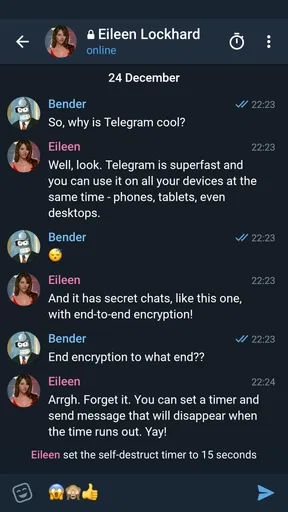
We all know how important privacy is these days, and Telegram X doesn’t skimp on this front. It offers end-to-end encryption, so you know your chats are safe from prying eyes. Plus, you can create secret chats that self-destruct after a certain time. It’s like having your own little spy tool, keeping your conversations private and secure.
I would make one distinction clear before relying on those options: a secret chat is a particular mode to choose for a conversation, not a reason to assume every ordinary chat has the same protections. If a discussion is sensitive, check that you have opened the intended kind of chat and understand its controls before sending anything. Self-destruction can be useful for temporary exchanges, but it is not a substitute for deciding whether a message should be shared at all.
For everyday coordination, a normal conversation may be the convenient choice; for a private exchange, the extra step of starting a secret chat may be worthwhile. That trade-off is easy to overlook when an app presents privacy as part of its identity. My advice is to build the mode you need into your habit instead of assuming the app will silently make that decision for you.
Customization without turning setup into a project
One of my favorite things about Telegram X is the level of customization it offers. You can change themes, tweak the appearance of your chat lists, and even adjust the way notifications work. It’s these little tweaks that make the app feel personal and suited to your style.
There is a useful boundary here: customization is valuable when it reduces distraction, not when you spend more time tuning the app than talking. I would start with one visual change and one notification adjustment, then use the app normally for a few days. If a setting makes it easier to spot a conversation or ignore an unimportant interruption, keep it. If you keep forgetting where you moved a control, return to a simpler arrangement.
Notifications are especially worth approaching deliberately. A lively group can produce enough interruptions to make any messenger feel demanding. Adjusting how notifications work can help separate conversations you need to notice from those you can check later. The benefit is not simply fewer alerts; it is being able to use the app without letting every group activity dictate your attention.
Bots and groups: useful when you choose them carefully
Telegram has always been known for its extensive bot integrations, and Telegram X is no different. You can add bots to automate tasks, play games, or even keep track of news. It’s like having a personal assistant within the app, ready to make your life a bit easier.
A sensible way to try bots is to treat each one as a separate tool rather than as a feature you must use. Pick a clear job, such as following updates or handling a simple task, and see whether the bot genuinely saves effort. Since bots are not the same as a private conversation with a person, I would be careful about what information I share with one and would avoid granting trust just because it appears inside a messaging app.
Groups are another good fit for a specific routine: a family making plans, a club coordinating a meetup, or a group of friends sharing updates in one place. In a busy group, muting can help you stay a member without being pulled into every exchange. You can then check the conversation when it suits you, rather than leaving it or letting it dominate your notifications.
Where the usual alternatives may be better
Compared with simpler messaging apps, Telegram X gives more attention to customization, interface behavior, and bot-based possibilities. That breadth is attractive if you like adjusting your tools and exploring extra ways to use a chat app. It can also mean more choices to learn, and those choices will not matter much if you only need an uncomplicated way to reach a small circle of people.
Some people will be better served by the messenger their contacts already use most. That can make coordination easier than asking everyone to move for the sake of a smoother interface. Others may prefer a more minimal app if they want fewer settings and less temptation to tinker. The right comparison is not which app has the most options; it is which one makes your actual conversations easiest to maintain.
A realistic example is planning a weekend visit with friends. I might use a group conversation to settle the time, mute it once the decision is made, and check it later for changes. If I need to send something that should be handled in a secret chat, I would start that conversation intentionally rather than assume the group thread is private in the same way. This mix of convenience and deliberate choices is where the app makes the most sense.
What switching involves
Changing your messaging app is partly a technical choice and partly a social one. Before making it your default, I would install it, adjust the appearance to something comfortable, and try it with a few conversations. That small trial helps answer the important questions: do you like moving around the interface, do the notification controls suit you, and are the people you need to reach available there?
There is also a learning cost. Swipe gestures can become quick shortcuts once you know them, but they may feel surprising at first. Custom themes and chat-list adjustments can take time to settle. I would not try to recreate every familiar setting on the first day; learn the basic flow first, then change only the parts that cause real friction.
The app is free, which makes trying it an easy decision if you are curious, but free does not mean there is no cost to switching. Your attention, setup time, and the effort of getting contacts to use another messenger all count. If your current app already serves your needs and your circle is not interested in changing, keeping it may be the more practical choice.
Who I would recommend it to
Overall, if you’re someone who enjoys having a messaging app that’s fast, customizable, and packed with features, then Telegram X is definitely worth the download. Whether you’re a tech enthusiast or just someone who wants a reliable way to keep in touch with friends, this app has got you covered.
I would especially suggest trying it if you spend a lot of time in conversations, appreciate control over how a chat list looks, or want the option of bots and secret chats alongside ordinary messaging. It is also a good candidate for someone who finds small interface delays or visual clutter irritating and enjoys making a tool feel more personal.
I would skip it if you need every contact to be on one particular service, strongly prefer a very simple interface, or do not want to manage settings and conversation modes. Someone choosing an app for a younger user should also take its Mature 17+ rating seriously. These are not flaws that a theme can solve; they are reasons to compare it with the habits and needs of the people who will actually use it.
So, why not give it a shot? You might just find that Telegram X becomes your new favorite way to chat. Happy messaging!
My recommendation is to try it as a considered alternative, not to switch every conversation at once. Use it for a few real exchanges, test the controls that matter to you, and notice whether your contacts will meet you there. If its responsive feel and adjustable layout make daily chatting more comfortable, it earns a place in your routine. If your main need is simply reaching people where they already are, staying with the messenger your circle uses may be the better decision.
Privacy and Permissions
See what permissions an app requests and how it handles your data.
- Identity
- find accounts on the device
- Contacts
- find accounts on the device, read your contacts
- Location
- approximate location (network-based), precise location (GPS and network-based)
- Phone
- read phone status and identity
- Photos/Media/Files
- read the contents of your USB storage, modify or delete the contents of your USB storage
- Storage
- read the contents of your USB storage, modify or delete the contents of your USB storage
- Camera
- take pictures and videos
- Microphone
- record audio
- Device ID & call information
- read phone status and identity
- Other
- view network connections, create accounts and set passwords, pair with Bluetooth devices, change system display settings, control flashlight, full network access, change your audio settings, read sync settings, run at startup, draw over other apps, control vibration, prevent device from sleeping, modify system settings, toggle sync on and off, read Google service configuration
Verdict
Strengths of Telegram X
- Sleek and intuitive user interface.
- Faster performance compared to the main app.
- Customizable chat themes and appearance.
- Supports advanced gesture controls.
- Enhanced media sharing capabilities.
Limitations of Telegram X
- Limited integration with third-party apps.
- Occasional bugs and crashes reported.
- No end-to-end encryption by default.
- Fewer bot support features than main app.
- Lacks some features of original Telegram.
Other Releases by Telegram FZ-LLC
View All
Telegram
Communication3.8
Similar Picks in This Category
View All
Meta Platforms, Inc.4.6

Instagram4.0

Likee-Live, Chat & Party Games
Likeme Pte. Ltd.4.4

Facebook Lite
Meta Platforms, Inc.4.5

TikTok - Videos, Shop & LIVE
TikTok Pte. Ltd.4.0

Moj: Free Short Drama & Reels
ShareChat4.1
Frequently Asked Questions
What is Telegram X and how does it differ from the regular Telegram app?
Telegram X is an alternative version of the popular messaging app Telegram. It is built on a different framework, which allows for smoother animations, improved speed, and enhanced battery efficiency. While it retains all core features of Telegram, it offers additional experimental features and a slightly different user interface for a unique experience.
Can I use Telegram X alongside the regular Telegram app on the same device?
Yes, you can use Telegram X alongside the regular Telegram app on the same device. Both apps function independently, allowing you to switch between them without losing any messages or contacts. This can be particularly useful for users who want to compare the features and performance of both versions.
Is Telegram X secure and does it offer the same privacy features as Telegram?
Telegram X maintains the same level of security and privacy features as the original Telegram app. It supports end-to-end encryption for Secret Chats, self-destructing messages, and passcode lock. Users can rest assured that their communications remain private and secure using Telegram X, just like with the standard Telegram app.
Does Telegram X support all the features available in the regular Telegram app?
While Telegram X supports most features available in the regular Telegram app, it also includes some experimental features and enhancements. However, there might be occasional differences in feature availability as Telegram X serves as a testing ground for new functions. Users can expect a unique experience with potential new updates.
How does Telegram X impact battery usage and performance on my device?
Telegram X is designed to be more efficient, offering improved performance and reduced battery consumption compared to the regular Telegram app. Its optimized framework allows for smoother animations and quicker load times, making it a suitable choice for users who prioritize speed and efficiency in their messaging applications.
